Loganathan
Expert
Unified Portal – EPF & UAN Guide
The Employees’ Provident Fund (EPF) is a government-backed retirement savings scheme managed by the Employees' Provident Fund Organisation (EPFO). It is designed to provide financial security and stability to employees after retirement or during emergencies.
The EPFO Unified Portal is a digital platform that integrates all EPF-related services in one place, allowing employees and employers to manage provident fund accounts easily without visiting offices physically.
With Indiaadvocacy, you can simplify PF processes, avoid delays, and manage your EPF account efficiently with expert guidance.

What is EPF?
EPF is a compulsory savings scheme where both employer and employee contribute a portion of the employee’s salary every month. The accumulated amount earns interest and can be withdrawn at retirement or under specific conditions such as medical emergencies, home purchase, or unemployment.
Contribution Structure:
• Employee Contribution: 12% of basic salary + DA
• Employer Contribution: 12% (split between EPF and EPS)
What is Unified Portal?
The Unified Portal is a centralized online system introduced by EPFO to digitize all EPF services. It eliminates paperwork and allows users to perform tasks such as checking balance, filing claims, updating KYC, and tracking contributions online.
It ensures transparency, faster processing, and 24/7 accessibility for employees across India.
Universal Account Number (UAN)
UAN (Universal Account Number) is a unique 12-digit identification number assigned to every EPF member. It links multiple PF accounts across different employers into a single unified identity, making it easier to track and manage funds.
- Single ID across multiple employers
- Easy PF transfer when changing jobs
- Centralized KYC verification
- Eliminates duplicate PF accounts
- Enables online access to EPF services
How to Get and Activate UAN
- UAN is generated automatically after your first EPF contribution
- Your employer provides the UAN details
- Visit the EPFO Unified Portal
- Click on “Activate UAN” option
- Enter UAN, Aadhaar, PAN, and mobile number
- Verify OTP sent to your mobile
- Create login credentials (username & password)
- Login and complete KYC verification
KYC Requirements
- Aadhaar Card (mandatory for verification)
- PAN Card (for tax purposes)
- Bank Account Details (for claim settlement)
- Mobile number linked with Aadhaar
Benefits of Unified Portal
- Check PF balance anytime online
- Track monthly contributions and interest
- Receive SMS alerts for transactions
- Submit withdrawal or transfer claims digitally
- Download passbook and UAN card instantly
- Update personal and KYC details easily
- Transparent and paperless system
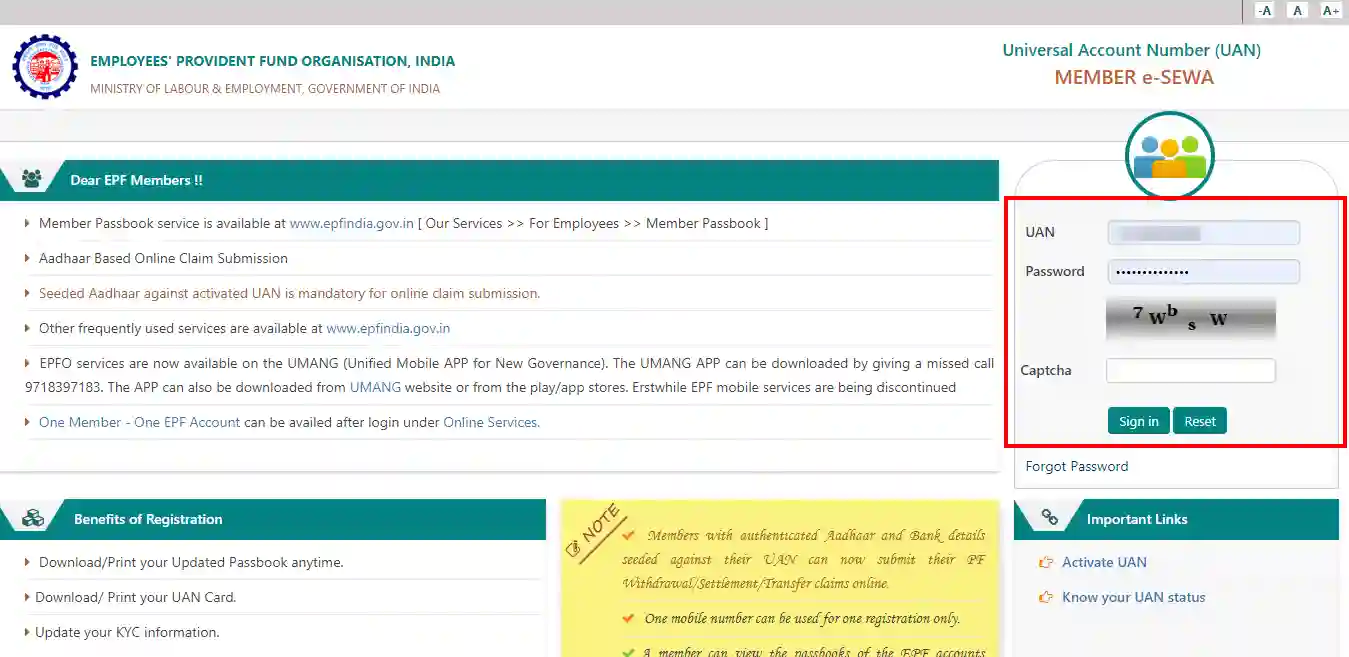
Services Available on Unified Portal
- PF balance check and passbook download
- Online claim submission (Form 19, 10C, 31)
- PF account transfer between employers
- UAN activation and profile update
- KYC submission and approval tracking
- Download UAN card
- View service history and employment details
How to Check PF Balance
- Login to EPFO Unified Portal using UAN
- Go to “View” section
- Click on “Passbook”
- Select your PF account
- View and download detailed statement
Types of EPF Claims
- Final Settlement (Form 19): After leaving job permanently
- Pension Withdrawal (Form 10C): For EPS benefits
- Partial Withdrawal (Form 31): For medical, education, home loan, etc.
Common Issues & Solutions
- UAN not activated: Verify mobile number and details
- KYC pending: Get employer approval
- Claim rejected: Check bank details and Aadhaar linkage
- Login issues: Reset password using OTP
Important Tips
- Always keep your UAN active and updated
- Link Aadhaar for faster claim processing
- Regularly check passbook for contributions
- Avoid multiple UANs across jobs
- Ensure bank details are correct before applying for claims
Frequently Asked Questions (FAQs)
Q1. Can I have multiple UANs?
No, only one UAN should be used across all jobs.
Q2. Is Aadhaar mandatory for EPF?
Yes, Aadhaar is required for KYC and claim processing.
Q3. How long does PF withdrawal take?
Usually 5–20 working days after approval.
Q4. Can I withdraw PF while working?
Partial withdrawal is allowed under certain conditions.
The EPFO Unified Portal has transformed the way employees manage their provident fund accounts by making the entire process digital, transparent, and user-friendly.
With Indiaadvocacy, managing EPF services becomes simple, fast, and hassle-free, ensuring you stay financially secure and informed.