Kavin
Expert
eAadhaar Download Guide
eAadhaar is the digital version of the Aadhaar card issued by the Government of India through UIDAI (Unique Identification Authority of India). It contains all essential details such as your Aadhaar number, biometric information, demographic data, and a secure QR code for verification.
eAadhaar is legally valid under the Aadhaar Act and is accepted across India for identity verification, address proof, KYC processes, banking, and government services. It eliminates the need to carry a physical card and allows instant access anytime, anywhere.
With Indiaadvocacy, you can easily understand how to download, use, and protect your eAadhaar securely without confusion.
What is eAadhaar?
eAadhaar is a password-protected electronic copy of your Aadhaar card digitally signed by UIDAI. It is equally valid as the physical Aadhaar card and can be used in both online and offline verification processes.
Key features include:
• Digitally signed document by UIDAI
• Secure QR code for instant verification
• Masked Aadhaar option (hides first 8 digits)
• Downloadable anytime from official portal
Why eAadhaar is Important?
- Acts as valid identity and address proof across India
- Instant availability in digital format without waiting
- Secure PDF protected with password
- Accepted for KYC in banks, telecom, and financial services
- Useful for government schemes, subsidies, and benefits
- Reduces dependency on physical documents
Eligibility to Download eAadhaar
- Must have a valid Aadhaar number or Enrollment ID (EID)
- Mobile number must be registered with Aadhaar
- Access to OTP verification via registered mobile
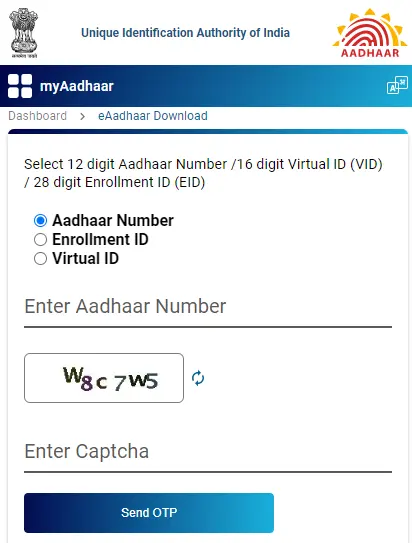
Step-by-Step Process to Download eAadhaar
- Visit the official UIDAI website (https://uidai.gov.in)
- Click on “Download Aadhaar” under My Aadhaar section
- Choose your preferred option: Aadhaar Number / VID / Enrollment ID
- Enter required details such as number, name, and PIN code
- Fill the captcha verification code
- Click on “Send OTP”
- Enter OTP received on your registered mobile number
- Click “Verify & Download”
- Your eAadhaar PDF will be downloaded
- Open using password (first 4 letters of name in CAPS + birth year)
Understanding eAadhaar Password
The downloaded eAadhaar file is protected with a password to ensure security. The password format is:
First 4 letters of your name (in CAPITAL letters) + Year of Birth
Example:
Name: RAHUL KUMAR
Year of Birth: 1998
Password: RAHU1998
Alternative Methods to Get eAadhaar
If you are unable to download your eAadhaar online, you can use the following options:
• Visit the nearest Aadhaar Enrollment Center or CSC (Common Service Center)
• Provide biometric authentication for identity verification
• Request a printed copy of your Aadhaar
• Use mAadhaar mobile app to access Aadhaar digitally
Check Aadhaar Update Status
- Visit UIDAI official website
- Click on “Check Aadhaar Update Status”
- Enter Aadhaar number or Update Request Number (URN)
- Complete captcha verification
- View your update status instantly

Download eAadhaar via DigiLocker
- Login to your DigiLocker account
- Go to “Issued Documents” section
- Select Aadhaar from UIDAI
- Link your Aadhaar number
- Verify using OTP
- Download your eAadhaar securely
Security Tips for eAadhaar
- Never share your Aadhaar OTP with anyone
- Download only from official UIDAI website
- Use masked Aadhaar for safer sharing
- Avoid storing Aadhaar on public or shared devices
- Verify QR code before using Aadhaar copy
Common Issues & Solutions
- OTP not received: Check mobile network or update registered number
- Wrong password error: Ensure correct format (NAME + YEAR)
- Details mismatch: Update Aadhaar details before downloading
- Website issues: Try again during non-peak hours
Frequently Asked Questions (FAQs)
Q1. Is eAadhaar valid everywhere?
Yes, it is legally valid and accepted across India just like the physical Aadhaar card.
Q2. Can I print eAadhaar?
Yes, you can print it and use it as a valid document.
Q3. What is masked Aadhaar?
Masked Aadhaar hides the first 8 digits and shows only the last 4 digits for security.
Q4. Is DigiLocker Aadhaar safe?
Yes, DigiLocker is a government-authorized secure platform.
Managing your identity documents digitally has become essential in today’s fast-paced world. eAadhaar offers convenience, security, and instant accessibility for all your verification needs.
With Indiaadvocacy, you can simplify documentation processes, avoid delays, and access government services efficiently with expert guidance.